Set up Aegis Connect in a few easy steps.
There's no new account to create. Once Aegis Connect is enabled for your organization, you sign in with something you already have.
From download to first call.
Make sure Aegis Connect is enabled for your organization
Aegis Connect is turned on for your whole organization at once. Not sure? Ask your administrator or our support team. The app signs in to your existing extension.
Download the app
Search for Aegis Connect on Google Play, or Aegis Connect Mobile on the App Store. The download buttons are just below.
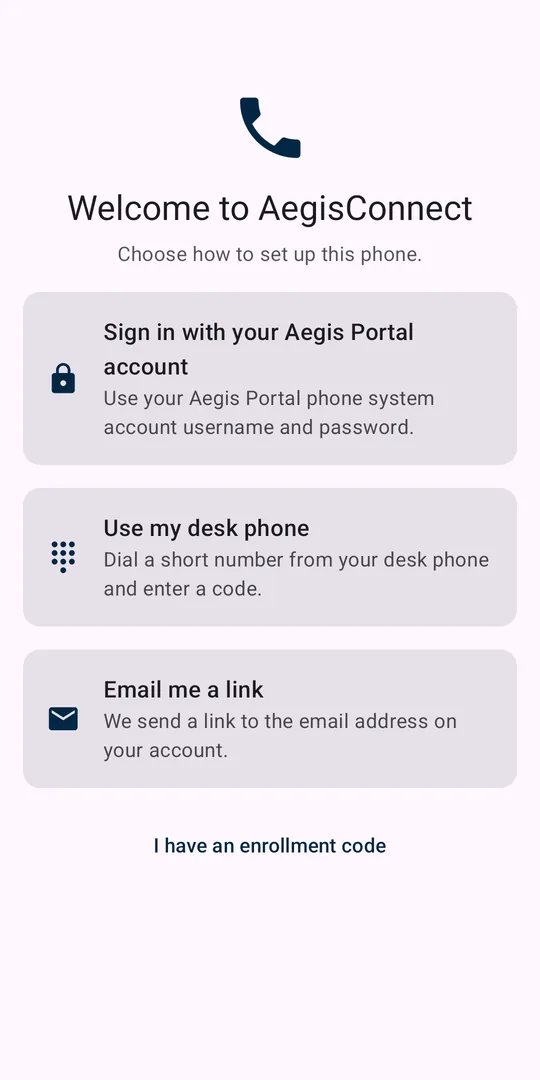
Choose how to sign in
Use your Aegis Portal login, dial a short number from your desk phone and enter the code, or have a sign-in link emailed to you. Got a code from your admin? Tap "I have an enrollment code."
Allow notifications and the microphone
So calls can ring with your screen off, and the other person can hear you.
Run "Check my setup"
A quick echo test confirms your audio both ways before your first real call.
Three ways to sign in.
- Aegis Portal account: use your phone system username and password.
- Your desk phone: dial a short number from your desk phone, then enter the code it gives you.
- Email link: we send a sign-in link to the email address on your account.
Your administrator controls who can use the app and what it can do.
Common questions
Does the app use my cellular minutes?
No. Calls travel as data over Wi-Fi and cellular data, not as carrier voice minutes. Because the app can send audio over both Wi-Fi and cellular at the same time for reliability, it may use some cellular data even while you're on Wi-Fi.
What number do people see when I call?
Your business caller ID, as set up by your administrator. If you have more than one business number available, you can choose which one to call as.
Can I call 911 from the app?
Emergency calls (911, 933, and 988) are handed to your phone's built-in dialer and placed over your mobile carrier, so emergency services receive your carrier's location information.
I need help.
Call or text 417-93-AEGIS, or email help@aegisvoip.com. If a call sounded wrong, you can also report it from inside the app.
Need a hand getting set up?
Our US-based team will walk you through it.